
Diagram Menu#
The "Diagram" menu contains buttons for actions that are necessary when building a Robot diagram.
.png)
Below is a list of these buttons with descriptions of their functions.
| No. | Interface Element | Description |
| "Align" button | Allows you to align the selected blocks according to a specified rule. | |
| "Position" button | Allows you to change the order of overlapping blocks. | |
| "Full Block Check" button | Allows you to perform a full check of the properties of the blocks. | |
| "Remove Unused Variables" button | Allows you to find and remove unused variables. | |
| "Compile Code Call Blocks" button | Allows you to compile all code call blocks in the project. This action speeds up the operation of these blocks. | |
| "Group" button | Allows you to group selected blocks so that they can be moved as a single unit. | |
| "Ungroup" button | Allows you to ungroup previously grouped blocks. |
The "Align" button in the tools menu allows you to align the selected blocks according to a specified rule. To choose the desired option, you need to click the icon .png) under the "Align" button.
under the "Align" button.
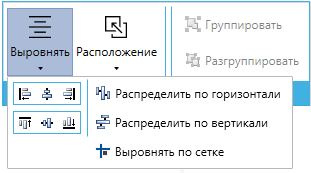
The "Position" button in the tools menu allows you to change the order of overlapping blocks. To choose the desired option, you need to click the icon under the "Position" button.
.png)
The automatic arrangement of blocks is demonstrated in the following video:
Automatic arrangement of blocks using a large project with a complex structure: