
User Parameters#
To authorize the User, it is necessary to enter the login and password of the Account on a separate login page of the Orchestrator.
If the authorization is performed by an Account User (more about Accounts is described here), it is necessary to enter the login and password for the Account, and OpenID authorization is also supported.
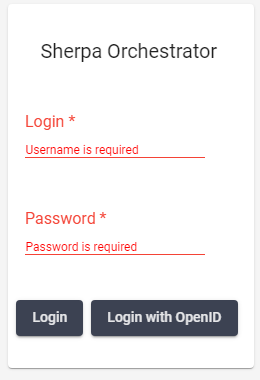
The session lifetime without active User actions is 15 minutes. The button .png) (Logout) clears the current User session and returns the User to the login screen. Within an Account, any number of Users can be created, with each User being a member of only one Account.
(Logout) clears the current User session and returns the User to the login screen. Within an Account, any number of Users can be created, with each User being a member of only one Account.
The following information is located on the top panel of the Orchestrator:
.png)
- button
.png) . Calls up the Sections popup menu;
. Calls up the Sections popup menu; - filter “Access Folders”. Allows filtering objects on the screens by object folders;
.png)
- non-editable field “Account:”. Displays the name of the current Account (if authorization was performed through an Account) or the Account to which the authorized User belongs;
- non-editable field “Company:”. Displays the company that was specified when creating the Account, to which the authorized User belongs;
- non-editable field “Department:”. Displays the department of the company that was specified when creating the current Account, to which the authorized User belongs;
- icon
.png) . Displays the name of the current User, clicking on which brings up the Logout button.
. Displays the name of the current User, clicking on which brings up the Logout button. - button
.png) . Allows changing the interface language of the Orchestrator, if necessary.
. Allows changing the interface language of the Orchestrator, if necessary.
.png)