
Version 1.43#
A new release of Sherpa Designer has been released: Version 1.43
- The "Project" tab has been replaced with "Solution" — a repository that combines multiple different projects in one place.
.png)
To launch the required project in the Solution, right-click on its name and select "Set as Active" from the context menu.
 (1).png)
- Added the ability to compare two project versions with a detailed report of changes in blocks, properties, connections between blocks, comments, and parameters.
.png)
To compare projects, open the "Tools" panel, then in the "Project" menu click the "Compare Versions" button.
- Specialized blocks for integration with the MAX messenger bot have been added to the "MAX" palette.
.png)
The "MAX Bot" demo project is located in the "Projects" folder.
.png)
- A "P7 Office Automation" palette has been added for working with P7 Office applications.
.png)
- An "ODS/ODT Automation" palette has been added for working with OpenDocument Text (ODT) and OpenDocument Spreadsheet (ODS) files. These formats are supported in domestic office suites such as P7-Office, as well as the open-source OpenOffice suite. Among non-domestic suites, Microsoft Office also supports them.
.png)
- An "S3 Storage" palette has been added for working with the Simple Storage Service (S3) cloud object storage.
.png)
- An "SSH" palette has been added for working with the secure network protocol for remote access to a server with SSH access enabled.
.png)
The blocks work with Amazon S3 and any S3 API-compatible instance.
- "Start Video Recording" and "Stop Video Recording" blocks have been added to the "Images / Video" palette. Only MP4 format is supported.
.png)
- In the "Databases" palette, the "Execute Stored Procedure" block now supports specifying a Dictionary in the "Output Parameters" property. The dictionary key is the parameter name and the value is the type.
.png)
- Automatic insertion of blocks into an existing connector has been implemented. When inserting, the other blocks automatically shift apart.
.png)
If a block can be inserted into a connector, it will be highlighted in green.
- Automatic block replacement has been implemented. If during drag-and-drop one block is hovered over another block of the same size and with the same number of outputs, it is highlighted in blue.
.png)
A replacement prompt then appears.
.png)
After confirmation by clicking "Yes", the new block takes the place of the old one while preserving all connections.
- A list of special keys has been added to the expression editor. These can be used in the "Press Keys" block.
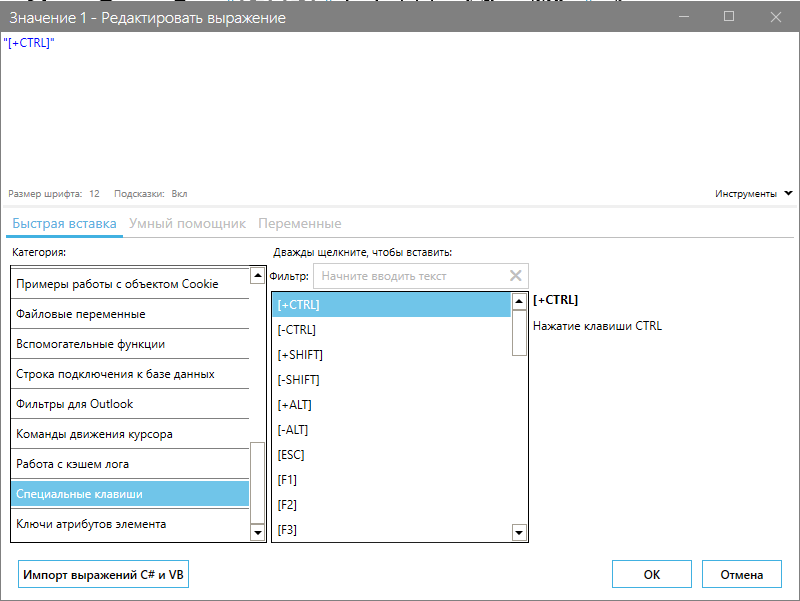
- An HTTP request builder has been implemented. To open it, on the "Development" panel in the "Additional" menu, click the "Request Builder" button.
.png)
Using it, you can configure a REST request in the corresponding window and automatically add a pre-configured "REST Client" block to the project diagram.
- A log cache has been implemented. This cache relates to "Log" blocks and is designed to retrieve logs of a specific process in a project and save them elsewhere. The cache is managed using PowerShell functions. The list of available functions is in the expression editor.
.png)
Available functions:
- manage log cache operation;
- clear the log cache variable;
- retrieve the log cache as text into a variable;
- retrieve the log cache in JSON format into a variable.
- Other improvements and refinements have been made to various parts of the system.