
Installing Browser Plugins#
The following plugins are available for installation in Sherpa Assistant:
- Chrome Plugin;
- Opera Plugin;
- Yandex Browser Plugin;
- Microsoft Edge Plugin;
- Mozilla Firefox Plugin.
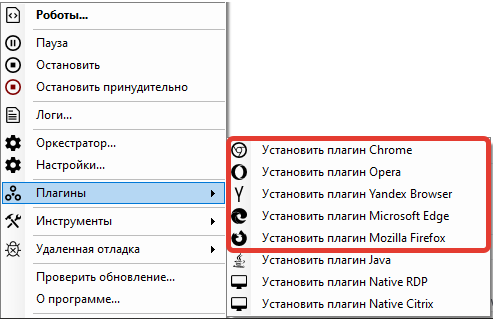
To choose the plugin you want to install, right-click on the icon .png) in the tray, select "Plugins" from the context menu, and then choose the desired plugin:
in the tray, select "Plugins" from the context menu, and then choose the desired plugin:
To install browser plugins, you need to:
- Open the desired browser;
- Paste the link from the clipboard into the address bar;
- Install the plugin from the Google Chrome store.
The address bar should appear after clicking on the desired plugin.