
Creating a Template Using the Example of the "Cost of Completed Work Report" Document#
In cases where one of the actions in the scenario involves recognizing and importing data from a scanned document, it is necessary to use the blocks from the OCR Automation tab, which are located on the main panel of the Designer (Sherpa Designer).
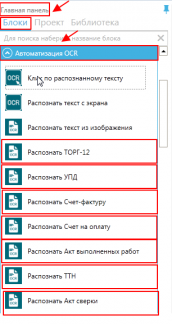
The Designer has pre-installed templates for the following types of documents:
- Trade12
- UPD
- Invoice
- Payment Invoice
- Act of Completed Work
- TTN
- Reconciliation Act
- Passport
- SNILS
- 2-NDFL
- CAPCHA
In cases where the robot needs to recognize information from a different type of document not specified in the OCR Automation tab, it will be necessary to create a document template. In this case, the "Recognize by Template" block is added to the project scenario.
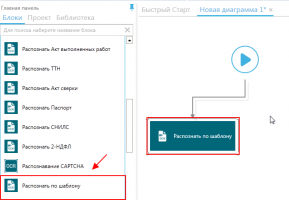
Based on the created template, the robot will subsequently recognize and process information from all documents of this type (Cost of Completed Work and Expenses Report, Act of Services Rendered, etc.).
A separate template is created for each type of document.