
Version 5.8.9#
A new release of Sherpa Orchestrator is out: Version 5.8.9.
- A toggle to display robots by groups has been added to the Robots screen.
Users can use the "Expand/Collapse groupings" toggle to expand or collapse groups in the robots list.
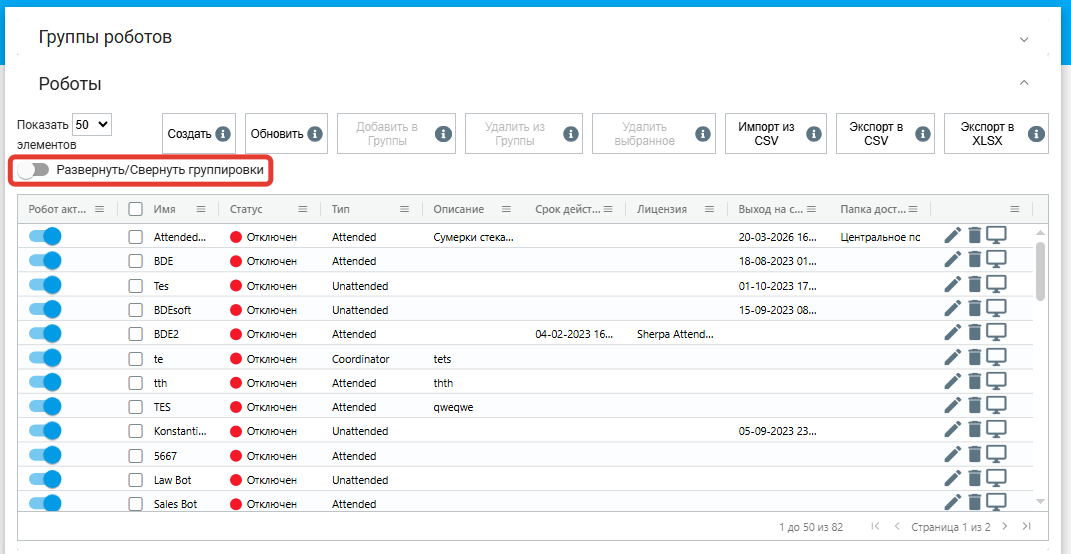
This makes it easier to browse the list of robots.
- Fixed selection of the process version when starting a job by a robot.
When a robot requests new work from Sherpa Orchestrator, the system first decides which job should be given to that robot and then provides the robot with data to start it: the process, the process version, and the .robot file. Now, the same selection order is used both at the decision stage and when the robot actually receives the job: job priority is considered first, then creation date.
This resolves cases where a robot could receive the job metadata but then start the wrong version of the process file. Now the robot launches the exact .robot file that corresponds to the selected job.
- Fix for transmitting the process version file hash.
Each published process version has a technical checksum of the .robot file, which Sherpa Orchestrator and the robot use to ensure the correct process file is used. Previously, some existing versions could miss this checksum, causing the robot to receive incomplete version file data.
Now Sherpa Orchestrator correctly computes the checksum and sends it to the robot when starting a job. For already existing process versions, missing checksums are recalculated.
This makes launching the correct process version more reliable and reduces the risk of errors when the robot downloads files.
- Fixed average task time calculation on the Queues screen when Sherpa Orchestrator works with PostgreSQL.
Now values in the "Average time (hours)" and "Average time (days)" columns are computed correctly.
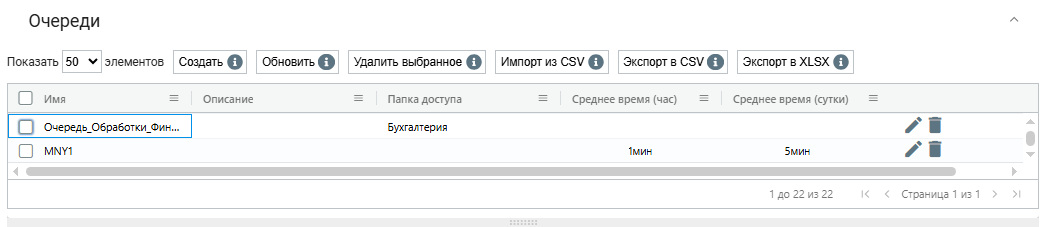
This helps users more accurately assess processing speed in queues.
- Improved file storage handling.
Sherpa Orchestrator now automatically checks for and creates required directories for file storage and verifies write access. If a file operation error occurs, Sherpa Orchestrator now logs more technical details: for example, which step failed, whether the target folder was accessible, and under which container user the operation ran.
This helps administrators diagnose issues with uploading, saving, or reading files more quickly, especially in Docker environments.
- Fixed export of robot messages on the Robot Messages screen.
Now when exporting messages, the number of exported rows matches the value selected in the "Show ... items" dropdown.
For example, if the user selected to display 100 items, the CSV export will use that value when exporting.
- Fixed the limit for displaying tasks in a selected queue on the Queues screen.
The limit is set by the administrator in Sherpa Orchestrator configuration via the MAX_TASKS_TO_VIEW parameter and limits how many tasks can be loaded into the task table of the selected queue. Now the UI correctly respects this limit when loading the list of tasks.
MAX_TASKS_TO_VIEW is set in the .env file for the Docker environment or in the service environment variables. This is a server-side setting applied when the UI interacts with tasks.
This improves stability when working with queues that contain a large number of tasks.
- Faster loading of the Processes and Packages lists when there are many jobs and robot messages.
Now when opening the Processes and Packages screens, Sherpa Orchestrator retrieves the required data faster for display.
This helps to open and browse processes and packages more quickly even when the system has accumulated a large number of tasks and robot messages.
- Faster loading of system metrics on the "System Metrics" dashboard.
Now data for the widgets is loaded by a single optimized database query with limited selection.
This helps the dashboard open faster and reduces system load when viewing metrics.
- Fixed handling of widget settings on the "System Metrics" dashboard.
Now Sherpa Orchestrator correctly handles missing or incomplete widget settings and does not fail to open the dashboard because of such data.
This increases the stability of the system metrics screen.
- Fixed VNC connection to a robot when Sherpa Orchestrator is served via HTTPS.
Now WebSocket traffic for VNC properly passes through nginx on the same domain.
This helps users connect to the robot from the UI without a connection error in HTTPS environments.
- Fixed returning the user to their original page after re-login.
If a session ended and the user logged in again, Sherpa Orchestrator returns them to the page they were working on before re-authentication.
Also, on the Actions screen, the ability to change column widths in the form designer has been added.
- Fixed the timer that moves tasks from status "Created" to "Abandoned" on the Queues screen.
Now the timer works correctly and does not transition a task to "Abandoned" earlier than expected after a manual status revert.