
User Authorization#
Local Authorization#
To create a User with local authorization, you need to set the “Local” flag in the form:
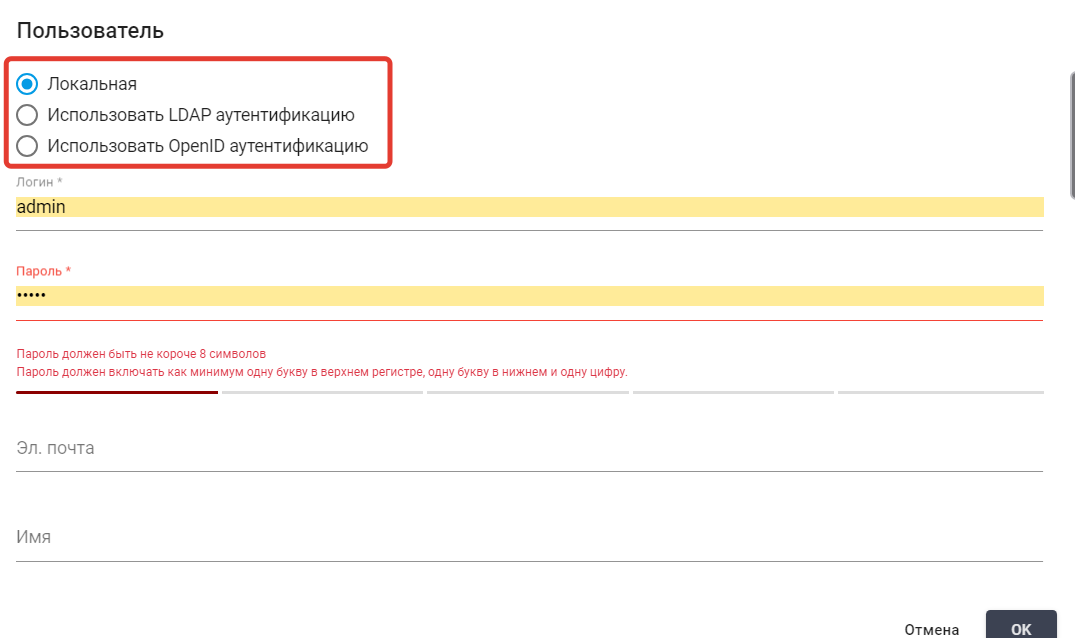
Then, in the corresponding fields, specify the Account login and its password.
LDAP Authentication#
To create a User with the login method “LDAP Authentication”, you need to set the flag: “Use LDAP authentication”.
.png)
Then fill in the “LDAP Users” field.
To use LDAP authentication, you need to fill in the corresponding parameters in the config.ini file located at: /opt/SherpaOrchestrator/backend/config/config.ini:
- ldap_server
- ldap_port
- ldap_encryption
- ldap_base_dn
- ldap_group
Then restart the container for installation via Docker (if installed locally, restart the server if necessary).
OpenID Authentication#
To create a User with the login method “OpenID Authentication”, you need to set the flag: “Use LDAP authentication”, and then fill in the “oAuth id” field:
.png)
To connect OpenID authentication, you need to fill in the corresponding parameters in the config.ini file located at: /opt/SherpaOrchestrator/backend/config/config.ini:
- oAuthClientId="clientId"
- oAuthClientSecret="clientSecret"
- oAuthAuthUri="https://OpenID.url/authorize"
- oAuthTokenUri="https://OpenID.url/token"
- oAuthUserInfoUri="https://OpenID.url/info"
When requesting a token, the Orchestrator passes the parameter ‘redirect_uri’.
If you need to specify the Callback URL manually, add to: yourDomainURL/api/gui/system/oAuthHook.
In the Account or User settings, select: "Use OpenID authentication".
Specify the User ID in the OpenID system.
In some cases (besides settings in Keycloak), you need to add the setting in the setup.ini file: oAuthUserLinkField="preferred_username".