
Screens#
The screen is part of the Orchestrator interface. Each screen within the Orchestrator represents a set of settings for organizing the work of Robots.
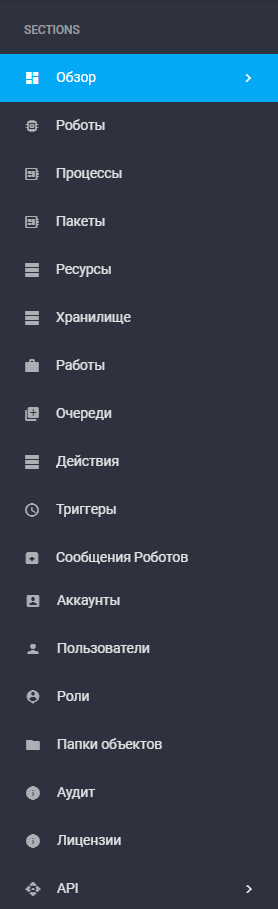
Descriptions of the screens are presented in the following table:
| No. | Screen | Screen Description |
| 1. | Overview | A dashboard with a set of widgets displaying key parameters and data slices regarding the operation of software Robots and the Orchestrator. Basic dashboard statistics (number of Robots, Processes, etc.) are displayed here. |
| 2. | Robots | Displays the “Robots” and “Robot Groups” tables. Allows various operations (creation, editing, grouping, etc.) with all available Robots in the Orchestrator. |
| 3. | Processes | Displays the automation scenarios executed by the Robots and their versions. |
| 4. | Packages | Displays packages and their available versions. |
| 5. | Resources | Displays a list of objects available to all Robots, Robot Groups, or a specific Robot. Supported resource types: text (text string), credentials (login-password pair), calendar. |
| 6. | Storage | Displays a list of Files and Folders. |
| 7. | Jobs | Displays the combination of a Process and the Robot assigned to execute that Process. |
| 8. | Queues | Allows grouping similar tasks, creating task flows, and adding tasks to Queues. |
| 9. | Actions | Allows creating separate workspaces within the Orchestrator, created using the Actions screen. Also, within this screen, actions for tasks in the Queue can be created, as well as a form for task execution. |
| 10. | Triggers | Describes conditions under which Jobs can be automatically created, subsequently launching Robots. |
| 11. | Robot Messages | Contains information about messages that Robots send to the Orchestrator during the execution of Jobs. |
| 12. | Accounts | Allows creating new Accounts as well as editing existing ones. |
| 13. | Users | Allows creating new Users as well as editing existing ones. |
| 14. | Roles | Allows defining a set of access rights to specific screens of the Orchestrator and functions within those screens. |
| 15. | Object Folders | Allows creating and editing access folders that provide the ability to more precisely delineate access to Orchestrator objects for different User roles. |
| 16. | Audit | Shows the Orchestrator's own events. |
| 17. | Licenses | Displays all Orchestrator Licenses, as well as a set of tools for creating, activating, and managing them. |
| 18. | API | Contains a set of tools for data exchange via API (reference for existing API methods, tools for obtaining a token for working with the API). |