
Version 2.2.0#
A new release of Sherpa AI Server has been released: Version 2.2.0
1. Solution Samples#
A tab with ready-made solution samples has been added to the Assistant's editing dialog.
.png)
Solutions can be created, edited, deleted, as well as imported and exported in CSV and Excel formats.
2. Interactive Buttons in Assistant Messages#
Assistants can now display buttons in their messages. Text enclosed in [[ ]] is automatically converted into clickable buttons.
Example of a system message:
.png)
Example of buttons within a message:

Supported in the web interface and the Sherpa AI Server widget.
3. Voice Messages#
The ability to record and process voice messages has been added, with automatic checking for the availability of the speech recognition service.
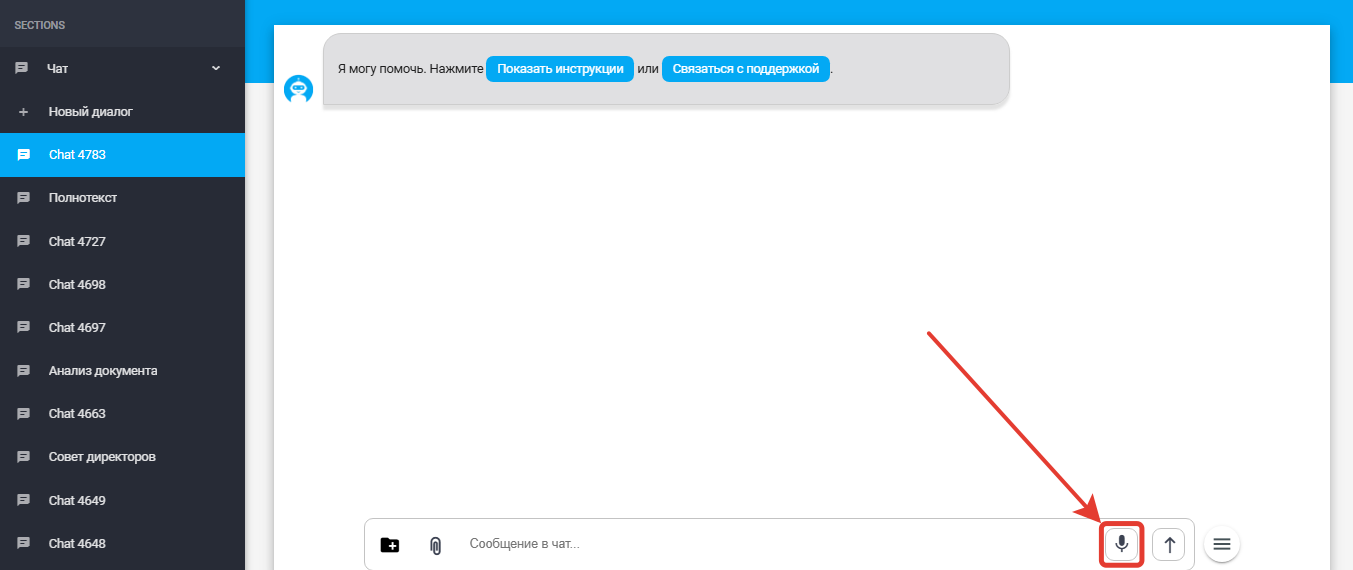
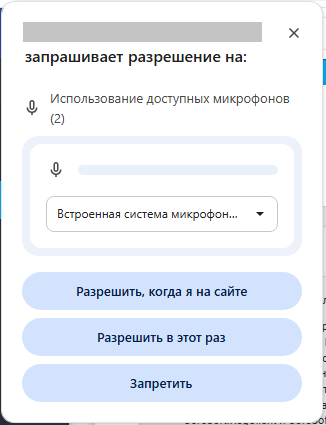
To send a message by voice, click the button %20(1).png) and allow microphone access in the pop-up window:
and allow microphone access in the pop-up window:
Complete the recording by pressing the button  (1).png) and the transcribed text will automatically appear in the message input field.
and the transcribed text will automatically appear in the message input field.
4. "Thoughts" Panel#
A collapsible "Thoughts" panel has become available in Assistant messages, displaying the Assistant's reasoning process.
.png)
Example of the reasoning process:
.png)
5. Assistant Management#
A delete button has been added in the Assistant's editing window.
.png)
6. Access to Version History#
The product version number is now clickable  and leads to a page describing all releases.
7. Interface Improvements#
Dark Theme#
The ability to switch to a dark mode interface has been added .png) .
.
To switch from light mode to dark mode, click the toggle in the lower left corner of the page.
.png)
General UI Improvement#
Text and icon alignment has been updated, the appearance of links has been improved, and the theme switcher display has been redesigned for more comfortable use.
More Understandable Hints#
Validation message texts have been improved when creating models.