
Main Interface of Sherpa AI Server#
After the User is authorized, the main interface of Sherpa AI Server opens, consisting of the following areas:
- User Parameters Panel (top panel).
- Workspace (central area of the screen).
- Left Panel.
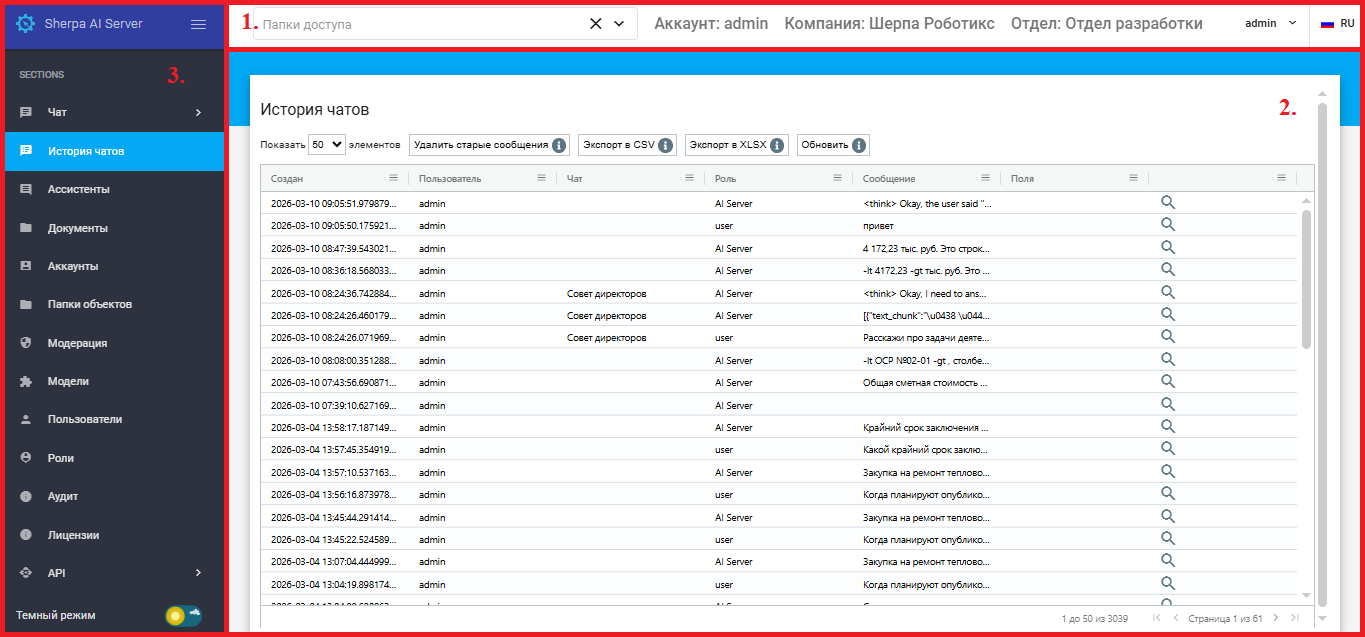
No item | Interface Element | Description |
| 1. | User Parameters Panel | Contains information about User parameters and allows actions within this Account. |
| 1.1 | Access Folders Field | Allows selecting directories that Assistants have access to. Defines data areas available for analysis in dialogues. |
| 1.2. | Static Element “Account:” | Displays the name of the authorized User's Account. For example,  |
| 1.3. | Static Element “Company:” | Displays the name of the company that was specified when creating the authorized User's account. For example,  |
| 1.4. | Static Element “Department:” | Displays the department of the company that was specified when creating the authorized User's Account. For example,  |
| 1.5. | Current User Button | Displays the name of the current User, for example  . This button allows displaying a pop-up menu for managing the Account. . This button allows displaying a pop-up menu for managing the Account. |
| 1.6. | Logout Button | Appears when calling the pop-up menu for managing the Account. Allows logging out of this Account. |
| 1.7. | Language Button | Allows changing the language of the Sherpa AI Server interface. Available languages: Russian and English. |
| 2. | Workspace | Area for working with the selected tool from the left panel. |
| 3. | Left Panel | Contains tools for effective and convenient work with artificial intelligence and neural networks. |
| 3.1. | Chat Tab | Allows creating new chats with the neural network, as well as managing chats and editing their list. |
| 3.2. | Chat History Tab | Allows reviewing what Users are discussing with the neural network, as well as its responses. |
| 3.3. | Assistants Tab | Allows creating and configuring interactions with personalized assistants. |
| 3.4. | Documents Tab | Allows uploading personal files to the Sherpa AI Server document storage and organizing them into folders. |
| 3.5. | Accounts Tab | Allows creating new accounts, as well as editing existing ones. |
| 3.6. | Object Folders Tab | Allows grouping related items by categories or projects. |
| 3.7. | Moderation Tab | Allows creating new rules and sets of rules, as well as editing existing ones within the Account. |
| 3.8. | Models Tab | Allows defining the method of response processing: either the request will be redirected to the model or sent to the Robot via API. |
| 3.9. | Users Tab | Allows creating new Users, as well as editing existing ones within the Account. |
| 3.10. | Roles Tab | Defines the set of access rights to various tools of Sherpa AI Server and functions within these tools. |
| 3.11. | Audit Tab | Displays personal events in Sherpa AI Server. |
| 3.12. | Licenses Tab | Displays all licenses in Sherpa AI Server, as well as a set of tools for creating, activating, and managing them. |
| 3.13. | API Tab | Reference for available APIs in Swagger format. |

